
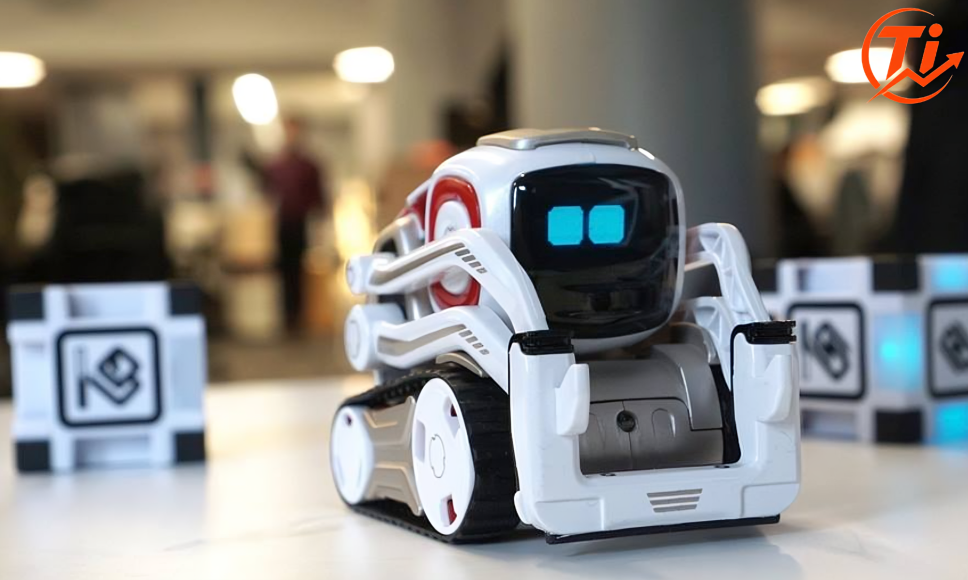
I still remember the first time I set up a Cozmo. It took four tries to connect to the robot’s own Wi-Fi network, my dog wouldn’t stop barking at the little guy’s blinking eyes, and I spent the next hour completely forgetting I was supposed to be “testing” it for work. That’s Cozmo in a nutshell. It’s a small, expressive robot that somehow makes grown adults talk to a piece of plastic like it’s a pet.
If you searched “cozmo” hoping for a straight answer about what this thing actually is, whether it’s still around, and if it’s worth your money in 2026, you’re in the right place. A lot of what shows up in search results right now is either seven years old or written by nobody in particular. This guide is current, practical, and honest about both the good and the frustrating parts.
Cozmo is a small educational robot originally made by Anki and now sold by Digital Dream Labs as Cozmo 2.0. It uses facial recognition, an “emotion engine” that mimics moods through its screen face, and a companion app for coding and games. As of 2026, Cozmo 2.0 costs around $399.99 and is aimed at kids aged 8 and up, though plenty of adults enjoy it too.
What Is Cozmo, Exactly?
Cozmo is a palm-sized robot that moves on tank treads, has a small lift arm, and displays simple animated eyes on its screen to show emotion. Anki, the original company behind it, designed Cozmo to feel less like a toy and more like a character with a personality that develops the more you interact with it.
The robot uses a camera for facial recognition, so it can learn to identify you and other people in the room, and it reacts differently depending on how you treat it. Win a game against it and it might do a little victory shimmy. Ignore it for too long and it’ll act bored or start knocking its cubes around out of frustration.
Underneath the personality, Cozmo is also a coding tool. Kids (and curious adults) can program it using Code Lab, a drag-and-drop visual interface built on Scratch-style blocks, or dig deeper with the Cozmo SDK for actual Python programming. That range, from a six-year-old dragging blocks around to a teenager writing Python scripts, is part of what made Cozmo popular with STEM educators in the first place.
A Quick History: Why “Anki Cozmo” and “Digital Dream Labs Cozmo” Are Both Correct
This is where a lot of confusion comes from, and honestly, most articles online skip over it or get it muddled.
- Anki launched the original Cozmo around 2016 as a consumer robotics and AI company (they also made the Overdrive racing sets).
- Anki shut down in 2019. The servers and support for existing Cozmo units were left in limbo for a while.
- Digital Dream Labs later acquired the Anki intellectual property, including Cozmo and its sibling robot, Vector.
- Digital Dream Labs relaunched an updated version, Cozmo 2.0, with hardware improvements and a rebuilt companion app.
So if you own an original Cozmo from 2016, you have a “Gen 1” unit made by Anki. If you’re buying new today, you’re buying Cozmo 2.0 from Digital Dream Labs. Both are valid, but they are not identical hardware, and the cubes and some accessories are not interchangeable between generations.
Worth knowing before you buy: Digital Dream Labs has had a mixed reputation with parts of its user community, including complaints about shipping delays and server downtime for its other robot, Vector. That doesn’t mean Cozmo 2.0 isn’t functional, but it’s fair context if you’re weighing a purchase.
Cozmo 2.0: What Changed From the Original
Cozmo 2.0 isn’t a totally new robot, but the upgrades address real complaints from the original model.
| Feature | Original Cozmo | Cozmo 2.0 |
| Battery life | Shorter runtime, non-user-replaceable | Around 30% longer, battery accessible at home |
| Camera | Lower resolution | 2MP camera, improved facial and pet recognition |
| Proximity sensors | Basic cliff sensors only | Added dedicated proximity sensors for better navigation |
| Accessories | Cozmo-specific parts only | Interchangeable with Vector treads and accessories |
| Power state | Only powered on while connected to a phone/tablet | Designed to be always-on with self-docking to charge |
The always-on, self-charging design is arguably the biggest practical change. The original Cozmo basically slept the moment you closed the app. Cozmo 2.0 is built to behave more like an actual autonomous robot that returns to its dock on its own.
Cozmo Price and Where to Buy It
As of 2026, Cozmo 2.0 is priced at $399.99 through Digital Dream Labs directly. You’ll also need the companion app, which currently has a small one-time fee (a few dollars) rather than being free.
That’s a noticeable jump from the original Cozmo’s launch price of $179.99 back in 2016. Part of that difference comes down to updated components (camera, sensors, battery), smaller production runs compared to Anki’s original manufacturing scale, and general cost increases in electronics manufacturing over the past several years.
A practical heads-up: Cozmo 2.0 tends to sell out quickly whenever new stock arrives. If you see “Coming Soon” or “Sold Out” on the product page, that’s normal rather than a sign the product has been discontinued. Setting up a restock notification is genuinely the most reliable way to grab one, since drops can sell out within hours.
You may also find listings on Amazon, Walmart, or Best Buy, though availability and pricing there can vary and sometimes reflects older stock or third-party sellers rather than current Digital Dream Labs units.
Cozmo vs Vector: What’s the Difference?
Vector is Cozmo’s more advanced sibling, also made by Digital Dream Labs after the Anki acquisition. People frequently search for both together, so here’s the practical breakdown.
| Aspect | Cozmo | Vector |
| Primary focus | Coding education, games, cube interaction | Voice interaction, always-on companion behavior |
| Physical interaction | Uses smart cubes for games and tricks | No cube-based games |
| Coding tools | Code Lab (Scratch-style) and Python SDK | More limited direct coding focus |
| Best for | Kids learning to code, classroom STEM use | Users wanting an ambient AI companion |
| Voice commands | Minimal | Designed around voice interaction (though this has depended on server availability) |
If your priority is teaching a kid the basics of programming logic through play, Cozmo is the more direct tool. If you want something closer to a small AI assistant that sits on your desk and reacts to you throughout the day, Vector fits that role better, though it’s worth researching current server support before buying either robot, since both have depended on Digital Dream Labs keeping backend services running.
Setting Up Cozmo: A Step-by-Step Walkthrough
Setup isn’t complicated, but a few steps trip people up consistently. Here’s the process in order.
- Charge Cozmo fully before first use. Give it a solid hour or two on the dock.
- Download the Cozmo app on iOS or Android and complete the small one-time app purchase if required.
- Turn Cozmo on and let it generate its own Wi-Fi hotspot, visible on its screen as a short code.
- On your phone, manually connect to that Wi-Fi network. This temporarily disconnects you from your home network, which is expected.
- Open the app and follow the prompt to pair with Cozmo.
- Complete the facial recognition step by entering your name and letting Cozmo’s camera scan your face.
- Once paired, explore Code Lab, Explorer Mode, or jump straight into games like Quick Tap or Keepaway.
The step most people get stuck on is step 4. If your phone automatically reconnects to your home Wi-Fi before pairing finishes, the connection fails. Turning off Wi-Fi auto-join on your phone, or temporarily forgetting your home network, solves this almost every time.
Common Cozmo Problems and Fixes
Based on recurring issues reported by owners, here are the fixes that actually work.
- Cozmo won’t connect to the app: Manually reconnect to Cozmo’s own Wi-Fi network rather than relying on automatic switching, and make sure your phone isn’t set to auto-rejoin your home network.
- App won’t open or crashes: Confirm you’ve completed the one-time app purchase and that your phone’s OS is updated, since Digital Dream Labs pushes compatibility updates after major iOS or Android releases.
- Cozmo doesn’t recognize your face reliably: Improve lighting in the room. Facial recognition accuracy drops noticeably in dim conditions.
- Cubes aren’t responding: Original Gen 1 cubes are not compatible with Cozmo 2.0 hardware, so double-check you’re using the correct generation of cubes for your unit.
- Battery draining fast: This is more common on original Gen 1 units. Cozmo 2.0’s redesigned battery and charging dock largely fix this complaint.
Is Cozmo Worth Buying in 2026?
Here’s the balanced answer, pros and cons included.
What Cozmo does well:
- Genuinely fun, expressive personality that holds attention longer than most “smart toys”
- Real coding education value, scaling from drag-and-drop blocks to actual Python
- Facial recognition and games add replay value beyond a single afternoon
- Cozmo 2.0’s hardware fixes real complaints from the original model (battery, sensors, camera)
What to weigh before buying:
- $399.99 is a significant price for a toy, even an educational one
- Requires a phone or tablet and Wi-Fi setup every time, which isn’t ideal for very young kids without adult help
- Stock availability is inconsistent, so patience or a restock alert is often necessary
- Digital Dream Labs’ track record with server support and shipping has drawn mixed feedback from parts of the community, which is worth researching before committing
If you’re looking for a screen-free toy, this isn’t it. But if the goal is introducing a kid to coding concepts in a way that doesn’t feel like homework, or you personally enjoy tinkering with a small robotics platform, Cozmo still holds up as one of the more approachable options in that space.
Read More: https://trendinginsight.co.uk/lorrie-morgan/
FAQs
What is Cozmo the robot?
Cozmo is a small educational robot with facial recognition, an expressive animated face, and app-based coding tools, originally made by Anki and now produced as Cozmo 2.0 by Digital Dream Labs.
Is Cozmo robot still available?
Yes. Cozmo 2.0 is sold directly through Digital Dream Labs, though stock frequently sells out and restocks can take time to appear.
How much does Cozmo robot cost?
Cozmo 2.0 is priced at $399.99 as of 2026, plus a small one-time fee for the companion app.
What happened to Anki, the original maker of Cozmo?
Anki shut down in 2019. Its Cozmo and Vector product lines were later acquired by Digital Dream Labs, which relaunched Cozmo as the updated Cozmo 2.0.
Is Cozmo the same as Vector?
No. Cozmo focuses on cube-based games and coding education through Code Lab and its Python SDK, while Vector is built more around voice interaction and ambient companionship.
What age is Cozmo robot for?
Digital Dream Labs markets Cozmo for kids aged 8 and up, though the coding tools scale well enough that teenagers and adults get real value from it too.
Does Cozmo need Wi-Fi to work?
Cozmo creates its own Wi-Fi network for pairing with the app and needs an internet connection for periodic software updates, but it doesn’t require constant home internet access to function day to day.
How do you code Cozmo?
You can program Cozmo through Code Lab, a visual drag-and-drop interface similar to Scratch, or through the Cozmo SDK, which allows more advanced users to write actual Python code to control the robot.
Conclusion
If you’re deciding between Cozmo and Vector, or trying to figure out whether your original Gen 1 Cozmo is still worth holding onto, the short version is this: Cozmo 2.0 fixes most of the original’s practical annoyances and remains one of the more genuinely useful “robot that teaches coding” products around, as long as you go in with realistic expectations about price and stock availability. If you’re on the fence, start by setting a restock alert on the official Digital Dream Labs page so you’re not stuck refreshing a sold-out product page every week.